


3e Encore
3.19.00 Reviews
App Specs
- Version
- 4.2616.3
- Updated On
- License
- Free
- Downloads
- 10,000+
- Developer
- SECUTIX SA
- Categories
- Events
- Platform
- Android
Screenshots
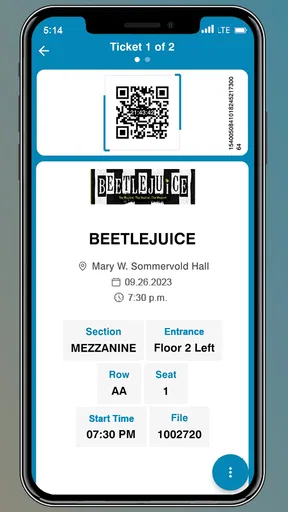
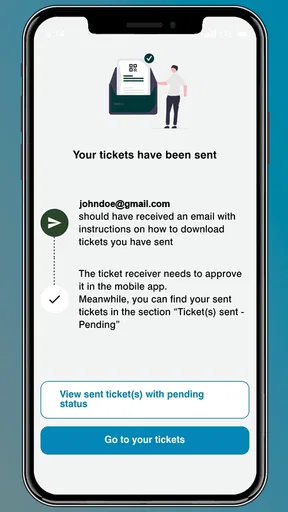
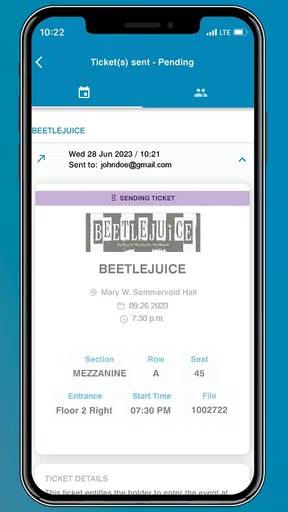
 Analysis by AppCompare
When I first look at an event-ticketing app, I am less interested in grand claims than in one practical question: will it make getting into an event calmer? 3e Encore is built around that exact moment. It is a free mobile ticketing app from SECUTIX SA, aimed at people who need to keep an event ticket on a phone rather than depend on a printed document or a separate browser session.
My first impression is that its appeal is immediate but quite specific. If an organizer uses this platform, the app can become a convenient place to handle the ticket connected with that event. The benefit is not that it replaces every event service on a phone; its usefulness depends heavily on whether the event you are attending is supported through this system. That makes the app worth considering as a practical companion, not as a universal ticket wallet.
From the first week to the long-term test
I find that the long-term test is less about how often I open 3e Encore and more about whether I can return to it after weeks away and still feel prepared. Building a quick pre-event check into my plans helps avoid treating an unfamiliar or updated app as a last-minute task. That habit also sets up a closer look at how easily its screens and ticket details can be read and navigated.
Why the first few days feel useful
The strongest part of the first-week experience is the reduction of small uncertainties. I can imagine opening the app before leaving home, checking that the relevant ticket is available, and keeping the phone ready for arrival. That simple routine is more comfortable than searching through email, switching between browser tabs, or trying to remember which message contains the correct entry document.
For a person attending a concert, exhibition, sporting occasion, or another organized event, a dedicated ticketing app gives the ticket a clear place in the phone. That separation matters when the inbox is crowded. Instead of treating the ticket as one more attachment, I can approach it as an event item that deserves a quick check before travelling.
The app is listed for everyone, which makes its intended audience broad. I would see it as suitable for occasional visitors as well as regular attendees, provided their event uses the service. It is also free, so there is no extra purchase decision simply to install it. That is helpful when an organizer directs attendees to a particular app shortly before an event.
One useful habit is to open the application while still at home, rather than waiting until I am standing in a queue. I would check the event name, confirm that the ticket is visible, and make sure the phone has enough battery for the journey and entry process. This is not a flashy feature, but it is the kind of preparation that prevents a small digital problem from becoming a stressful public one.
Worth Reading Before You Choose

EA SPORTS FC Mobile 26 Is a Bigger Football Game, but It Takes Time

Flipboard Shows What News Apps Must Do Beyond the Feed

Switching to Android Auto Means Rethinking Your Driving Routine

Google Calendar Makes a Crowded Week Easier to Manage

Ludo King Makes the Most of the Minutes Between Plans

Baby Panda World Brings Quick Play to Modern Phones, but Its Game Library Feels Busy
Where it fits beside ordinary alternatives
The usual alternatives are a ticket in an email, a mobile website, a PDF saved on the device, or a ticket held inside a broader wallet application. Those options can be perfectly adequate when the organizer supports them well. Their advantage is familiarity: most people already know how to open email or a browser.
3e Encore makes more sense when the event provider has designed the ticket journey around it. In that situation, a dedicated app may feel more direct than hunting through unrelated messages. On the other hand, if I only attend one event and the organizer also offers a straightforward browser ticket, installing another application may feel like unnecessary preparation. The app earns its place when it removes repeated searching, not merely because it exists.
That distinction is important. I would not recommend downloading it in advance as a general-purpose solution for every future event. I would install it when the event instructions clearly call for it, then judge it by how reliably it helps with that specific occasion. This keeps expectations realistic and avoids confusing a venue-specific tool with a universal ticket manager.
The small workflow that makes the app more dependable
My preferred workflow would be to install the app before the day of the event, complete any required setup while I have a stable connection, and then revisit the ticket before travelling. I would also keep the confirmation message or booking details available separately until entry is complete. That is not a criticism of the app; it is sensible backup behavior for any digital ticket.
A second useful approach is to avoid leaving the first check until the entrance. Queues are a poor place to troubleshoot an unfamiliar app. If the ticket is not where I expect it to be, I want time to reread the organizer’s instructions and verify that I am using the correct account or event details. The app can be part of a smooth process, but it cannot compensate for last-minute preparation.
For groups, I would decide in advance who is responsible for presenting which ticket. Passing one phone around at the gate can create avoidable confusion. If each attendee has an appropriate ticket arrangement, the dedicated app may be easier to manage; if one person holds everything, the result depends more on that person’s battery, connectivity, and ability to move through the app quickly.
What remains valuable after the novelty fades
The first use of any event app can feel more impressive than the tenth. Once the novelty disappears, the question becomes whether it saves enough effort to justify staying installed. In my view, the recurring value of 3e Encore is strongest for people who attend events connected to the same ticketing environment more than once.
For those users, the app can become a familiar checkpoint: open it, locate the event, verify the ticket, and move on. That repeatable behavior is more valuable than a long list of occasional extras. A ticketing tool does not need to dominate my phone; it needs to be dependable during the few minutes when I need it.
For an occasional attendee, the value is more temporary. The app may be useful around one event and then sit untouched for a long period. That does not make it a poor application, but it changes the maintenance decision. I would keep it installed if another event is likely to use the same system soon. Otherwise, removing it after the event and reinstalling it when needed may be a reasonable way to keep the phone uncluttered.
Its current version is listed as 4.2616.3, and the app supports Android 7.0 or later. That broad operating-system reach is useful for people who do not own a recent phone, although real-world comfort will still depend on the device, its battery condition, and how quickly it handles the application. I would update it before an important event rather than discovering an available update while preparing to enter.
Maintenance without turning the app into a chore
The maintenance burden is fairly easy to understand. The app is not something I would expect to open every day. Its upkeep is mainly about keeping it installed when an event is approaching, allowing it to remain current, and checking the ticket before travel. That is a lighter commitment than a social network or a service that demands regular attention.
Still, infrequent apps can create their own friction. An application that has not been opened for months may require an update or may feel unfamiliar again when I suddenly need it. My practical solution would be to open it several days before the event, not minutes before it. This turns maintenance into a short scheduled check rather than an emergency task.
I would also avoid assuming that installing the app alone completes the process. The organizer’s message remains important because it may explain how the ticket reaches the application and what account or booking reference is involved. The app is the viewing and entry tool; the surrounding booking instructions are still part of the workflow.
There is another maintenance trade-off for households and shared devices. If several people use one phone, a ticketing app can be convenient for the person who manages bookings, but less convenient for everyone else if the ticket is tied to a particular login. I would clarify responsibility before the event. That small decision can prevent repeated sign-ins or a queue-side discussion about whose phone should display the ticket.
Where fatigue starts to appear
The main source of fatigue is not necessarily the interface. It is the possibility of accumulating separate event applications. People who attend events from many organizers may be asked to install different tools, each used only occasionally. In that situation, a universal wallet, a well-organized email system, or a browser-based ticket may be less tiring than maintaining another dedicated app.
There is also a psychological cost to depending on a phone at the entrance. Screen brightness, battery level, connectivity, and a busy crowd all become part of the ticket experience. I would not blame 3e Encore for every one of those conditions, but I would include them in the decision. Anyone who regularly travels with a nearly empty battery or an older device should prepare more carefully.
The app’s average rating is 3.1 from around seventeen ratings, with nine written reviews. I read that as a signal to keep expectations measured rather than as a definitive judgment. The sample is small, but it suggests that the experience may not feel equally smooth for everyone. I would therefore test the complete ticket path early and keep the original booking information accessible until the event is over.
Another fatigue point is limited recurring use. A dedicated ticket app can be excellent when it is connected to an event I am definitely attending, yet offer little reason to open it between occasions. That is acceptable for a utility, but it means the app must be judged by reliability at key moments rather than by how entertaining or feature-rich it feels during idle browsing.
Who will get the most from it
I think the app is best suited to three kinds of users. The first is someone whose event instructions specifically identify 3e Encore as the ticket destination. The second is a regular attendee of events that use the same SECUTIX SA ticketing environment. The third is a person who prefers keeping tickets in a dedicated place instead of searching through a crowded inbox.
It can also help someone who organizes a family outing and wants to check the tickets ahead of time. The important word is “ahead.” I would use the app to prepare the group before leaving, not to experiment with it while everyone is waiting at the gate.
I would be less enthusiastic for a person attending one isolated event where a mobile web ticket is already clear and easy to access. I would also hesitate to recommend it to someone who dislikes installing single-purpose apps, especially if their events come from many unrelated organizers. In those cases, the normal browser or a broader wallet may provide a simpler long-term routine.
How I would decide whether to keep it installed
My decision would come down to repetition. After the first event, I would ask whether finding and presenting the ticket was easier than using the organizer’s other available method. If the answer is yes and another supported event is likely, keeping the app makes sense. If the answer is no, or if the app was needed only once, I would not treat permanent installation as mandatory.
I would also judge it by preparation time. A good ticketing app should make the final check quick, but it still deserves an early trial. If I can open the event, recognize the ticket, and understand what I need to show without hesitation, it has earned practical trust. If I repeatedly need to return to emails or search for instructions, the app is providing less value than its dedicated purpose suggests.
The free price removes one barrier, and the everyone age classification makes it approachable for a broad audience. Those points are useful, but they do not override the central limitation: the app’s usefulness is tied to the events and ticketing arrangements that support it. That is the trade-off I would explain to a friend before recommending it.
My long-term verdict
3e Encore is a focused tool rather than an app I would expect to become part of my daily phone routine. Its lasting value comes from dependable repetition: when the same ticketing system serves several events, the app can become a familiar and sensible part of getting out the door. When it is used for one isolated occasion, its value may end as soon as the ticket has been scanned.
I like the idea of having a dedicated place for an event ticket, and I would use this app when an organizer makes it the clearest route. My recommendation is conditional but positive: install it early, test the complete ticket workflow before travelling, keep the booking details available as a backup, and decide after the event whether future use justifies keeping it.
For regular attendees of supported events, that modest habit can earn the app lasting space. For everyone else, a browser ticket, email, or existing wallet may be less effort. In my experience, that is the honest way to view 3e Encore: a useful event companion when it matches your ticketing ecosystem, but not a universal replacement for every way of carrying a ticket.
Pros
- Simple interface makes core features easy to find.
- Useful for practicing music skills at your own pace.
- Encore support can help users revisit difficult sections.
- Lightweight app is suitable for quick practice sessions.
- Clear presentation benefits beginners and casual learners.
Cons
- Limited appeal if you do not use the Encore system.
- Some content may require additional purchases or access.
- Practice tools may feel basic for advanced musicians.
- Performance can vary depending on device compatibility.
- The app may offer fewer customization options than competitors.
FAQs for 3e Encore
What is 3e Encore, and what can I use it for?
3e Encore is a mobile application designed to support users with access to the 3e Encore platform and its related services. Depending on your organization or account setup, it may provide access to assigned content, resources, schedules, communications, or other features. The exact tools available can vary, so users should confirm that their institution or service provider supports the app before downloading it.
Is 3e Encore free to download and use?
The app may be available to download without an upfront charge, but access to its features can depend on an account, subscription, organization, or service agreement. In other words, installing 3e Encore does not necessarily guarantee unrestricted access to every function. Check the official listing and your provider’s instructions for information about fees, eligibility, and any in-app requirements.
Do I need an account or invitation to use 3e Encore?
In most cases, 3e Encore is intended for users connected to a participating organization, program, or service, meaning an account or invitation may be required. You may need login credentials supplied by an administrator rather than creating an account independently. If you cannot sign in, verify your username, password, activation instructions, and access permissions with the organization that provided the app.
Which devices and operating systems are compatible with 3e Encore?
Compatibility can depend on the version of Android or iOS installed on your device, as well as the current release of the application. Before downloading, review the official Google Play or App Store listing for the minimum operating-system requirement and supported device information. Keeping your phone updated can also improve stability, security, and compatibility with newer app versions.
What should I do if 3e Encore does not work or I cannot access my content?
Start by checking your internet connection, confirming that you are using the correct account, and installing any available app updates. Closing and reopening the app or restarting your device may resolve temporary issues. If problems continue, avoid repeatedly entering uncertain login details and contact your organization’s administrator or the developer’s official support channel, including your device model and a description of the error.


